Jamf vs JumpCloud
Your Mac fleet needs more than basic enrollment. Compare Jamf Pro and JumpCloud on device controls, security, pricing, and the case for using both.
 Ahmad ZakariaNovember 27, 2026
Table of contents
- Where Jamf and JumpCloud Fit and Where They Don't
- Jamf vs. JumpCloud: A Detailed Comparison
- What Both Platforms Leave to You?
- How the Physical Layer Fits Underneath Either Platform
- How Does Firstbase Work With Jamf or JumpCloud?
- Which Platform Is Right for Your Team?
- Keep Your Mac Fleet Moving, From Hire to Retire
As an IT manager or an IT director overseeing hundreds of Macs at a distributed, Apple-first company, you rely on Jamf for device enrollment, app deployment, and security policies.
Employee identities and application access often sit with Okta or Microsoft Entra ID, with Jamf Connect managing Mac logins. That's several tools to pay for and maintain.
JumpCloud cuts down the tool juggling by covering Mac management, user accounts, and access permissions. But switching to it comes with trade-offs, particularly in the depth of Apple-specific management and security controls.
This Jamf vs. JumpCloud comparison breaks down those differences so you know what to expect from each platform. We'll also cover how Firstbase fills the hardware lifecycle gaps both leave, from device retrieval to reuse and disposal.
Where Jamf and JumpCloud Fit and Where They Don't
Each platform has its strengths, but their capabilities have limits. Here's where each fits into your IT operations and what you'll still need to manage separately.
Firstbase
Automate up to 75% of hardware lifecycle management
Including inventory restocking, bulk device refreshes, and equipment returns, without manual tracking or spreadsheet updates. Use Firstbase’s ROI calculator to estimate your potential savings in time and hardware costs.
Use the ROI calculator →Jamf vs. JumpCloud: A Detailed Comparison
The real differences start showing up in your everyday IT work. Here’s how Jamf and JumpCloud compare in practice.
Device enrollment and Mac management
Jamf Pro gives you detailed control over Mac configuration and inventory management. It lets you collect custom device data using scripts and use those details to create Smart Groups that automatically target devices with relevant policies.
JumpCloud supports automated enrollment, configuration profiles, and device policies too. Its advantage is the connection between device management and user identities. But the capabilities are lighter than Jamf, as several users have also pointed out in their reviews:
“JumpCloud’s MDM features for macOS and iOS are fairly limited when compared to Jamf Pro. While you can push profiles and commands, the platform does not provide in-depth macOS inventory information, such as detailed app-level insights or granular configuration profile data.”
“Its primary drawbacks are feature shallowness compared to specialized tools, such as the lack of deep macOS controls in Jamf or the advanced identity governance in Okta.”
Endpoint security and compliance
Jamf Pro lets you enforce security settings on Macs, including FileVault encryption, password policies, and device restrictions. For advanced protection, Jamf Protect adds threat detection, behavioral monitoring, and security telemetry. You can also use its compliance tools to assess devices against security benchmarks.
JumpCloud combines endpoint management with a cloud directory, single sign-on (SSO), and multi-factor authentication (MFA). You can also use conditional access policies to control application usage based on user identity, device trust, and contextual factors.
For an Apple-first fleet, Jamf Protect offers more specialized macOS threat detection. JumpCloud is a better fit if you want to manage devices, user identities, and application access in one platform.
Ease of use and integration
Jamf Pro takes time to get familiar with, especially if you're new to Mac administration and need to learn its advanced configuration options and multi-step workflows. Multiple users point to this issue:
“For a novice user, you will want to either set aside quite some time to get to know the interface and advanced options well or bring in someone who does. Otherwise, you'll be left out of the more advanced (read: the best) capabilities of Jamf Pro.”
“The primary downside is that Jamf Pro can initially seem a bit overwhelming. With its wide range of features, it takes time to become familiar with the platform.”
The platform integrates with ServiceNow and Splunk for IT service management and security monitoring. Its APIs and webhooks support custom integrations.
JumpCloud also takes time to learn, particularly when configuring directory integrations, user permissions, and device policies. Its broad range of settings adds to the initial setup work.
Moving existing users and devices to JumpCloud also requires careful planning to avoid disrupting device and employee access management. The platform's users say:
“The interface and policy structure can feel complex at times, need to navigating multiple areas of the console, slow down the initial setup for new administrators.”
“While JumpCloud aims for simplicity, migrating from an existing directory service (like Active Directory) or setting up complex configurations (e.g., custom RADIUS, intricate Conditional Access Policies) can be challenging and require significant technical expertise.”
It integrates with Google Workspace, Microsoft 365, Active Directory, and HR platforms such as BambooHR and Workday. These connections support user provisioning, directory synchronization, and employee onboarding and offboarding.
Here, neither platform has a clear advantage in ease of use. Your team's existing technical expertise and the complexity of your integrations will have a greater influence on setup time.
Pricing
Jamf gives a 14-day free trial to test the platform. Its pricing plan uses a per-device model: Jamf for Mac is $12.50 per Mac/month, billed annually, with a 25-device minimum. This bundle includes Jamf Pro, Jamf Connect, and Jamf Protect.
JumpCloud charges per user. Its Device Management plan starts at $9/user/month with annual billing, or $11 with monthly billing. Device Identity Management costs $13/user/month annually, or $15 monthly. The platform gives you a 30-day trial period.
Jamf charges per Mac, while JumpCloud charges per user. The Jamf bundle includes identity and security tools that aren't part of JumpCloud's basic Device Management plan, so compare equivalent features when estimating costs.
The right choice depends on your device fleet, security priorities, and existing IT setup. For teams that need both specialized Mac management and centralized identity controls, using Jamf Pro and JumpCloud together is also an option.
What Both Platforms Leave to You?
Both platforms work well for remote device management, but physical hardware operations still fall to your IT team. Platform users mention these gaps that still need attention.
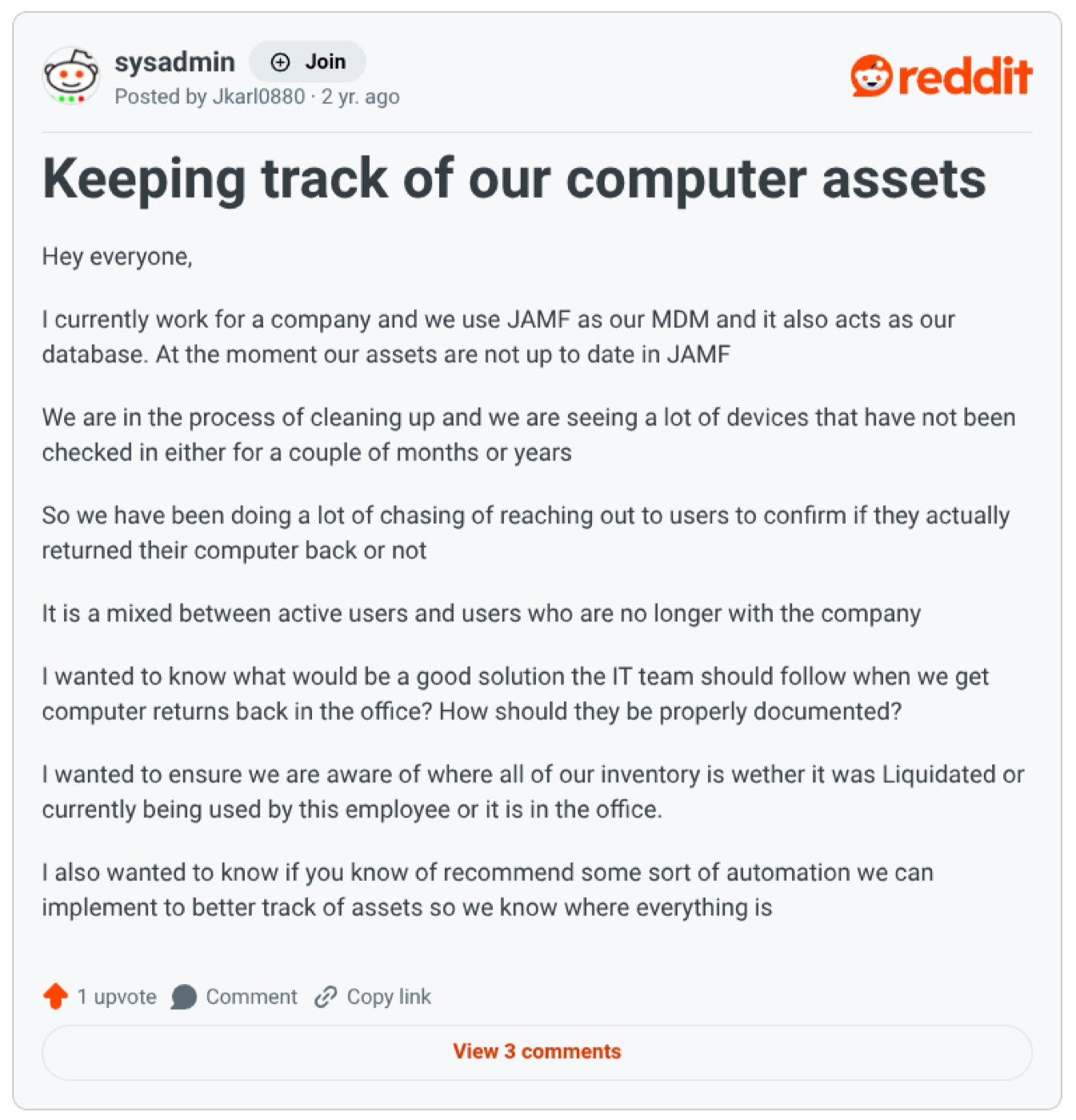
Device records don't confirm physical returns
Even with Jamf tracking your Mac fleet, confirming device returns remains a separate task. Here's a Reddit thread discussing this issue.
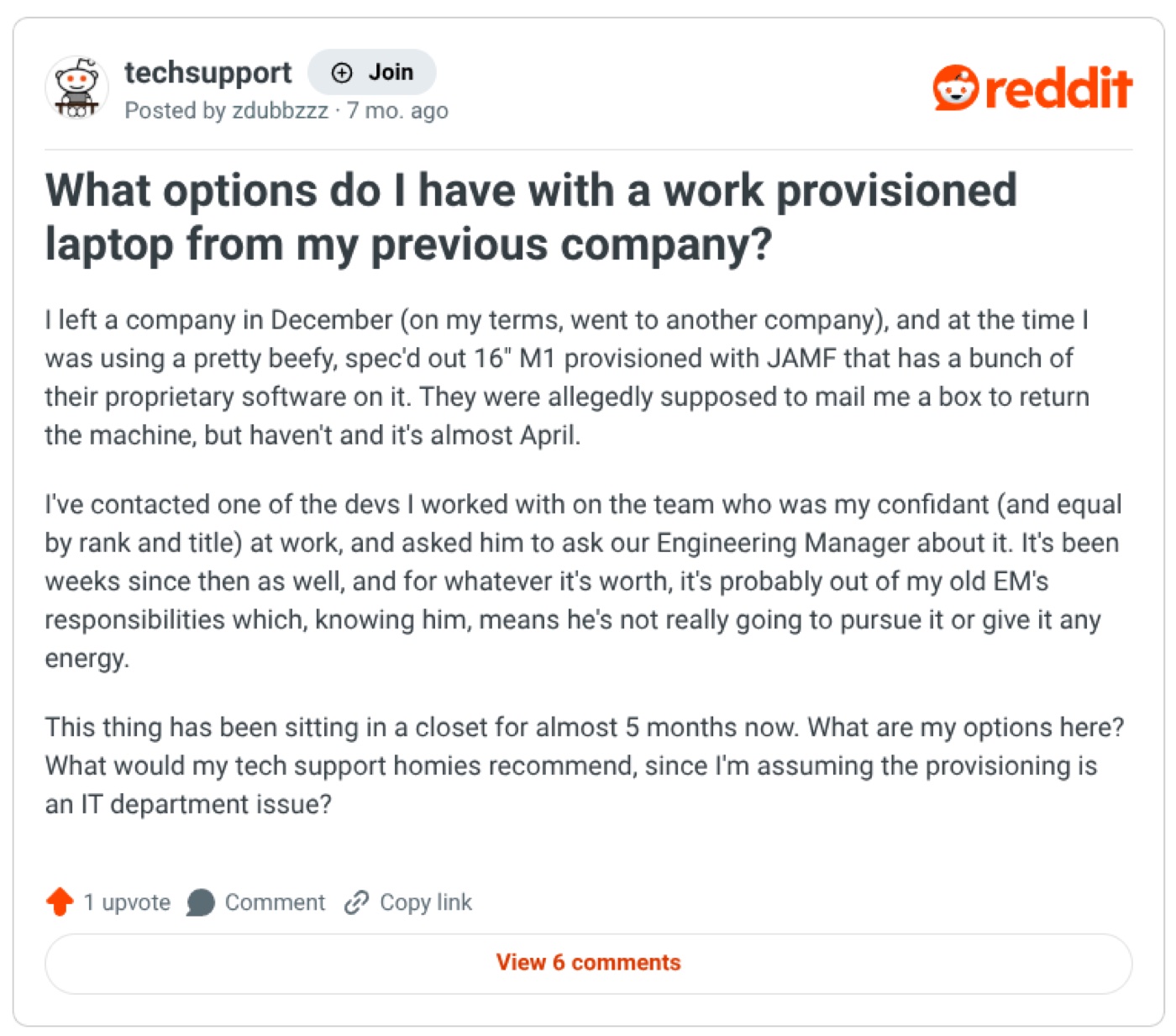
Delays in recovering Macs after offboarding
You can secure a departing employee's Mac remotely, but getting it back still requires separate coordination. The following Reddit discussion highlights this:
Beyond these reported issues, neither platform directly covers the following physical hardware operations:
Purchase laptops and arrange delivery to employees in different countries.
Inspect returned devices for physical damage and prepare suitable units for redeployment.
Manage international shipments, including customs clearance and import duties.
Carry out physical device destruction or recycling and obtain the relevant certificates.
How the Physical Layer Fits Underneath Either Platform
Jamf and JumpCloud manage devices through software. But an enrollment record or an offboarding command doesn't tell you whether a laptop has reached an employee, been returned, or is ready for its next user.
An asset lifecycle platform covers the physical work behind those device records, including procurement, shipping, retrieval, storage, and redeployment. It complements your existing mobile device management and identity tools without replacing them.
Here’s how the system works together:
IT task | Jamf Pro or JumpCloud | Device lifecycle platform |
|---|---|---|
New employee onboarding | Enroll the device, configure settings, and deploy apps | Procure laptops, coordinate device preparation, ship them to employees, and track delivery. |
Employee offboarding | Revoke access and initiate remote device actions | Arrange device pickups and track returns through receipt. |
Device reassignment | Configure the Mac for its next user | Inspect, store, and ship the returned device |
Hardware refresh | Manage enrollment and security policies for replacement devices | Deliver replacements and collect retired equipment |
End-of-life disposal | Maintain device records and initiate supported erase commands | Coordinate physical recycling or disposal |
How Does Firstbase Work With Jamf or JumpCloud?
You don't need to replace Jamf Pro or JumpCloud to use Firstbase. It integrates with both platforms, connecting device management data with physical hardware operations.
As an Apple Authorized Reseller, Firstbase supports Apple Business Manager enrollment. It takes care of procurement, global shipping, device recovery, repairs, storage, and redeployment. You can bring your existing Mac fleet into the platform without purchasing new hardware through it.
Let's look at how it manages your hardware lifecycle:
Keep device security and hardware records connected
Firstbase syncs device security information, including disk encryption, antivirus protection, firewall settings, and session lock status. Each device also receives a security risk classification as high, moderate, or low.
Device information syncs automatically every hour, and you can refresh it on demand. Registered Jamf Pro webhooks also support real-time updates.
Throughout this process, Jamf Pro or JumpCloud continues managing device security and configurations, while Firstbase keeps the relevant information updated in your hardware inventory.
Procure and deliver employee laptops
Firstbase manages Mac procurement and vendor coordination. Employees can order approved devices through its Virtual IT Closet, a self-service portal with role-based hardware catalogs that limit unauthorized purchases.
You also get a dedicated customer success manager and access to an onshore team for device orders, shipping coordination, and troubleshooting.
For global teams, the platform supports local invoicing and fulfillment in over 150 countries, delivering duty-paid devices in 2-5 days average with built-in tax and customs optimization.
It connects with your HRIS to automate equipment provisioning before an employee's first day. Its zero-touch deployment workflow covers MDM configuration and shipping, so your IT team doesn't have to manually prepare each Mac. Our client says:
We had no solutions available for our fully remote company, without hiring a dedicated employee to deal with shipping things out of their home. Firstbase provided a fantastic solution by managing and shipping equipment to all our fully remote team members.
Firstbase has saved us hundreds of hours dealing with equipment ordering and returns. We've been able to focus on projects that mean more to the company, on both the HR and IT ends.
- Caitlin Nielson, People Operations Manager, Verse
Recover laptops when employees leave
Deactivating an employee's account doesn't return their laptop. Firstbase manages the physical return process, achieving a 97%+ device retrieval rate, compared with a 70% industry average.
The process starts with confirming the departing employee's address. Firstbase then sends a retrieval kit with prepaid shipping labels and packing materials, arranges courier pickups, and updates the return status.
It also escalates outstanding returns to your IT team when necessary. Recovered laptops are then cleaned and assessed for their next use.
Repair, Store, and Redeploy Returned Devices
Firstbase inspects returned Macs, arranges repairs, and stores reusable laptops for redeployment to other employees. This recovery and reuse process can reduce excess hardware inventory by 30%.
Returned Macs undergo condition checks and diagnostics to identify any damage. Devices needing repairs remain unavailable until fixed. The platform coordinates warranty-covered repairs with Apple-authorized providers, while your IT team can review and approve quotes for out-of-warranty work.
For Macs held in storage, you can view available stock by warehouse, set minimum inventory levels, and receive restocking alerts.
You can also prioritize used Macs in employee equipment orders or restrict orders to refurbished stock. Firstbase securely wipes eligible returned devices, reinstalls macOS, and repackages them for the next employee.
Retire hardware with secure data destruction
When a Mac reaches the end of its useful life, Firstbase manages its retirement through IT asset disposition (ITAD) services. This includes secure data removal, destruction when needed, recycling, and resale of eligible devices.
It follows data sanitization methods aligned with NIST 800-88, including Clear, Purge, and physical destruction. You also receive Certificates of Destruction as proof of completed processing, typically available within 60-90 days of the request.
Which Platform Is Right for Your Team?
Your existing IT setup and management priorities will influence whether Jamf Pro, JumpCloud, or both are the right fit. Here's how each option works for different teams.
Choose Jamf Pro if | Choose JumpCloud if | Use both if |
|---|---|---|
Your company mainly uses Macs and needs detailed Apple-specific device management. | Your company manages a mix of macOS, Windows, and Linux devices. | You need Jamf's Apple-specific management capabilities alongside JumpCloud's identity services. |
You need granular configuration profiles, restrictions, patch management, and Apple security controls. | You want to manage user identities, device access, and security policies through one platform. | You want Jamf to manage Mac configurations and JumpCloud to manage user authentication and identities. |
You already use a separate identity provider and want to strengthen Mac management without replacing it. | Your IT team needs centralized directory services, SSO, MFA, and device management. | Your Apple-heavy organization needs advanced Mac controls alongside centralized identity management for a broader IT environment. |
Your IT team has the expertise to manage Apple-specific policies and workflows. | You prefer a consolidated approach to identity and endpoint administration. | You're comfortable maintaining two platforms with distinct responsibilities and integration points. |
Keep Your Mac Fleet Moving, From Hire to Retire
Choosing Jamf Pro, JumpCloud, or both doesn't remove the physical workload from your IT team. You still need to get Macs to new hires on time, retrieve them from departing employees, coordinate international returns, and maintain proof of secure disposal.
Switching platforms also won't fix delayed international shipments, unreturned laptops, or equipment sitting unused in storage. These challenges call for hardware lifecycle management from the first shipment to the final return.
With Firstbase's support for global laptop shipping and returns, Cresta's three-person IT team saved around 270 hours in a year, even as the company doubled its headcount. Book a demo to see how we can manage your Macs throughout their lifecycle.
Written by
Ahmad Zakaria
Ahmad Zakaria covers IT operations, hardware lifecycle management, and distributed workforce solutions at Firstbase. His content is built from real customer data, operator interviews, and hands-on experience managing devices across 150+ countries.
Get started with
Firstbase today
Remote and hybrid work aren't going anywhere. It's our mission to make it easier to manage the assets your distributed team needs—from onboarding through offboarding and every repair, replacement, and upgrade in between.
Fill out the form and a member from our team will reach out by phone!
Get a Live Demo