Hardware Asset Management That Tracks Devices Beyond the Network
Choose the right hardware asset management tool with a decision matrix built for distributed, Apple-first IT teams.
 Ahmad ZakariaNovember 26, 2026
Table of contents
- What is Hardware asset management (HAM) and how is it different from ITAM and SAM?
- What are the stages of the Hardware Asset Management lifecycle?
- What are the biggest challenges in hardware asset management?
- What are the best hardware asset management tools?
- Which HAM KPIs matter for a distributed fleet?
- Which Hardware Asset Management tool fits your business model?
- What does accurate HAM look like for a distributed team?
When laptops stayed in the office, Hardware asset management (HAM) was easier, because a network scan could count them, and it worked.
Distributed work took that away. Laptops now ship to home addresses before anyone confirms MDM enrollment. Some stay with employees long after the offboarding ticket closes. Retired ones sit in storage closets that no system checks. None of these moves trigger an update, so your HRIS and MDM slowly fall out of sync.
This guide is for IT managers and directors at Apple-first companies with 500+ employees across several countries, and also the security and finance teams who depend on that inventory for SOC 2 audits and refresh budgets. We explain where hardware records break down and how platforms like Firstbase help distributed IT teams maintain accurate inventory by coordinating device shipping, retrieval, and updates across the hardware lifecycle.
What is Hardware asset management (HAM) and how is it different from ITAM and SAM?
Hardware asset management is the practice of tracking every physical IT device from purchase to disposal, including who has it and where it is.
IT asset management (ITAM) is the umbrella. Hardware Asset Management system is the process that covers the physical assets, and Software Asset Management covers the licenses. ITAD covers what happens when a device is retired. They get lumped together because some vendors sell them as modules in one suite.
Scope |
What it tracks |
|
ITAM |
Every IT asset a company pays for |
IT hardware, software, cloud subscriptions, contracts, costs |
HAM |
Physical assets, from purchase to disposal |
Serial number, assigned user, location, condition, warranty, disposal record |
SAM |
Software licenses and entitlements |
Installs, license counts, usage, renewal dates |
What are the stages of the Hardware Asset Management lifecycle?
Every company device goes through the same stages, from purchase to disposal. Here’s see what should happen at each stage and where it usually goes wrong in remote work.
Stage |
What should happen |
Where it breaks for distributed teams |
1. Plan and procure |
Forecast equipment needs, select devices, order stock, and record purchases. |
Different regions have different suppliers, shipping times, and import requirements. |
2. Deploy |
Configure devices, arrange delivery, confirm receipt, and record user assignments. |
Devices ship before MDM enrollment is confirmed, or delivery and assignment records remain disconnected. |
3. Manage |
Track device location, ownership, status, repairs, warranties, and refresh maintenance schedules. |
Employees move or change devices without timely hardware inventory updates. |
4. Retrieve |
Start returns when employees leave, or devices need replacing. Arrange shipping, collection, and receipt. |
Offboarding closes before the device returns, leaving IT to chase employees and carriers. |
5. Redeploy |
Inspect returned equipment, assess its condition, securely wipe data, repair if needed, and prepare it for another user. |
Returned devices sit ungraded or unrepaired, while teams order replacements. |
What are the biggest challenges in hardware asset management?
For distributed teams, records stop matching where devices actually are. That gap is called drift, and it happens in three places, each with a different cause for the following.
System drift: HRIS, identity providers (IdPs), mobile device management (MDM) platforms, and IT service management (ITSM) tools hold different parts of the asset record. If an employee changes roles, leaves the company, or receives a replacement device, those records may not update together. IT can end up with conflicting information about device ownership, assignment, or status.
Physical drift: It happens when a laptop changes hands, and no system hears about it. An MDM check-in confirms the Mac is on and connected. It doesn't carry who's using it or where. So if a departing employee gives the laptop to a teammate or takes it abroad, the console still shows it assigned to the same person.
Dormant drift: It’s the easiest to miss. A switched-off Mac stops checking in and eventually drops out of reports. That's usually what happens to spares and returns stacked in an office storage room, especially when bulk returns get logged one device at a time. Meanwhile, Apple's warranty keeps counting down from the purchase date.
What is the difference between system of record vs. system of action?
These are two roles in an IT workflow, not two mutually exclusive types of IT hardware asset management tools. A system of record maintains the trusted data about an asset, such as its serial number, assigned user, status, and lifecycle history. A system of action uses that data to trigger or carry out work, such as approving a request, assigning a device, or starting a return.
Many asset platforms do both. ServiceNow, for example, uses its CMDB as a source of truth while also automating hardware lifecycle workflows. Jira Service Management Assets stores and connects asset data to requests, incidents, and changes, and supports automation and imports.
For distributed IT teams, the workflow must also capture what happened to the physical device. A return ticket may be closed, for instance, but that alone does not confirm the laptop reached the warehouse. A logistics platform such as Firstbase can complement an existing asset or service desk system by coordinating shipping, retrieval, and receipt, and sharing those updates with connected systems
Your team shouldn’t have to choose one role over the other, but should keep asset records aligned with the work and the device’s actual movement.
What are the best hardware asset management tools?
Let’s have a quick overview of the top hardware management tools:
Category |
How it learns a device exists |
Example tools |
Sees well |
Blind spot |
Best for |
ITSM-native asset modules |
Discovery, imports and connectors feeding the CMDB |
ServiceNow HAM JSM Assets |
Links between devices, tickets and changes |
Device moves that no connected source reports |
Enterprises already on ServiceNow or Jira that want assets tied to incidents, changes and audits |
Discovery-led ITAM |
Continuous network discovery and reconciliation |
Ivanti |
Ownership, cost and lifecycle data in one record |
Devices that are offline or off the network |
Teams on Ivanti ITSM that want asset data to drive endpoint automation |
MDM used as inventory |
The device reports itself when it enrolls |
Jamf Iru (formerly Kandji) |
Hardware specs and data security state |
Unenrolled devices and who physically holds them |
Apple-first teams running zero-touch deployment that need device data as audit evidence |
Standalone asset trackers |
Imports, directory and MDM syncs, barcode scans |
Asset Panda |
Custody and handoff history |
Anything since the last scan or manual update |
Multi-department teams tracking custody and inspections without a full service desk |
Lifecycle platforms |
The record is created when it buys, ships, or receives a device |
Firstbase |
Shipping, retrieval, storage, and disposal |
Software licenses and service tickets, which stay in SAM and ITSM tools |
Distributed teams shipping, retrieving, and retiring devices across countries |
ITSM-native asset modules
These tools keep the device record inside the service desk, so IT can see which tickets and changes touch a device. They're only as current as the connectors and imports feeding them.
ServiceNow HAM uses the CMDB as its source of truth and automates procurement, deployment, and disposal, with AI (artificial intelligence) agents that normalize hardware data. It also covers stockrooms, repairs, and data center assets, which suits large enterprises already standardized on ServiceNow.
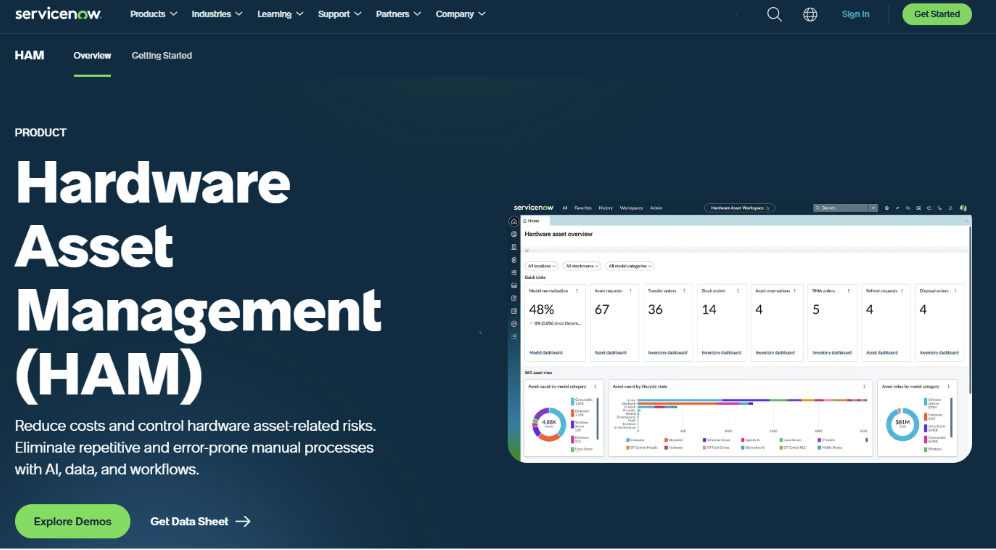
Users point out that reporting suffers when asset data isn't clean, and that rollout is slow because governance and process ownership have to be defined first.
Jira Service Management gives Jira teams a flexible asset model with an effective Hardware Asset Management template, scheduled imports, and 30+ connectors, including Jamf and Intune. Assets link straight to requests, incidents, and changes.
Some users say configuration management and upkeep take real effort, and workflows and permissions get harder to manage when the initial setup isn't tailored well.
Discovery-led ITAM
Discovery tools scan continuously and reconcile what they find into one record. They work best for devices that check in regularly.
Ivanti builds ITAM into its Neurons platform, combining identity, asset usage, financial, and configuration data per asset. Procurement, purchase orders, and shipment tracking come with the full module on Ivanti ITSM, and that asset context feeds Ivanti's endpoint automation.
Multiple users mention a steep learning curve and heavy initial configuration. Some also find the admin interface dated next to newer cloud platforms.
MDM used as inventory
For Apple fleets, the MDM is the most reliable source for what a device is and how it's configured. It can't record a device before enrollment or after removal, though, and it doesn't handle shipping or returns.
Jamf collects inventory automatically, from serial number and UDID to encryption status and enrollment method, and uses smart groups to trigger IT management tasks.
Users find smart group criteria awkward to edit because they can only add new criteria at the end of the list, and they want better reporting and error handling.
Iru (formerly Kandji) builds the device record at enrollment with no agent or manual entry, and exports hardware reports that map to NIST CSF 2.0 ID.AM-01 evidence.
Its users report chat-only support and automated enrollment with SSO that can stall, leaving IT to assign users by hand.
Others want finer reporting filters, and the 25-device minimum for macOS management makes consolidation harder for small Mac fleets.
Standalone asset trackers
These platforms give teams custody records without rolling out a full service desk.
Asset Panda checks devices out to people or locations, captures signatures, runs inspections, and syncs users and devices from Okta, Entra ID, Jamf, and Apple Business Manager. Each department gets its own views and forms.

Users mention that adding assets by hand is slow and that asset tag labels are limited to two formats.
Lifecycle platforms
Lifecycle platforms do the physical work, so records update as devices are bought, shipped, stored, retrieved, and retired.
Firstbase integrates with tools across IT service management (ITSM), mobile device management (MDM), and HRIS. ITSM integrations include ServiceNow and Zendesk, while MDM integrations include Jamf and Iru. It also connects with HRIS platforms such as Workday, BambooHR, and HiBob.
These integrations can trigger workflows across systems. For example, an employee’s termination date in an HRIS can start a device retrieval, while a ServiceNow ticket can trigger a Firstbase workflow. The Firstbase API also supports returns, replacements, offboarding, and warehouse restocking.
Office Pickup collects bulk hardware asset inventory from offices, including untracked devices logged by category and quantity, and automatically generates NIST 800-88 certificates of destruction.
What doesn't Firstbase handle?
Firstbase focuses on the physical device lifecycle, while software licenses and service tickets remain in your SAM and ITSM tools. New-hire orders also depend on when your HRIS creates the employee record. If that record arrives late, the order may be delayed too. Teams that need an earlier trigger can use the Firstbase API to build a custom onboarding workflow.
At 1,000 employees and 15% annual churn, even a 70% retrieval rate means about 45 laptops lost a year, roughly $67,500 in hardware. Take a self-guided tour to see how Firstbase gets those devices back into inventory.
See Firstbase in action
Get back 10-15 hours per week
Take a self-guided product tour and walk through the same workflows that help IT teams get back 10-15 hours per week on equipment ordering, returns, and retrieval coordination.
Learn more →Which HAM KPIs matter for a distributed fleet?
A device count alone cannot tell IT whether its inventory is accurate, equipment is coming back on time, or returned hardware is ready for reuse. Track these six KPIs.
KPI |
What to measure |
Why it matters |
Inventory reconciliation rate |
Percentage of recorded assets confirmed against physical inventory or reliable device records |
Shows how much of the inventory has been verified, rather than simply entered into a system. |
Offboarding-to-return time |
Time between an employee’s offboarding and the device’s confirmed return |
Highlights delays in collecting equipment from departing employees. |
Retrieval-to-redeploy time |
Time from receiving a returned device to making it ready for another employee |
Shows how long recovered IT equipment remains unavailable for reuse. |
Devices past refresh policy |
Percentage of active devices older than the organization’s defined refresh date |
Helps IT identify equipment that may need replacement and plan spending. |
Retired devices with a CoD |
Percentage of retired devices requiring destruction that have a Certificate of Destruction on record |
Helps verify that destruction documentation is complete and accessible for audits. |
Retrieval rate |
Percentage of devices expected back that are successfully returned. For example, Firstbase reports a 97% retrieval rate while the industry average is 30-50%. |
Measures recovery performance and helps identify gaps in offboarding. |
Set KPI targets using your own baseline, device policies, and IT operations requirements. For example, measure retrieval time by region to identify where shipping or employee handoffs cause delays, rather than imposing an unsupported universal target.
Where HAM ends, and value recovery begins
Retirement is not the same as disposal. Before sending a device for recycling or destruction, IT should check whether it can be reused or resold. For example, a wiped, working Mac still has resale value, but that value drops every month it sits in storage while someone decides what to do with it. That decision depends on its condition, age, and expected resale value.
Firstbase provides real time resale estimates for aging devices in its app, based on age, demand, and condition. So IT and finance can see what a device is worth before choosing to resell, recycle, or keep it. Its ITAD workflow also keeps disposition records and Certificates of Destruction (CoDs) in the platform, giving teams a documented record of the device’s retirement.
For equipment already in office closets, storage rooms, or other physical locations, Firstbase’s Office Pickup service lets administrators create bulk ITAD requests for both tracked and untracked inventory. Firstbase-managed pickups are available in the US; international offices can use admin-managed or self-managed shipping.
Their inventory reporting is particularly unique and powerful for us as a HIPAA-compliant healthcare company. Firstbase enables us to focus our time, attention, and team on our core business.
- Malinka Walaliyadde, CEO and Co-Founder, Akasa
Which Hardware Asset Management tool fits your business model?
Current setup |
Right choice if… |
Not right if… |
Add Firstbase if… |
ITSM-native |
You manage assets and service requests in one system. |
Physical returns need separate coordination. |
Offboarding closes, but devices don't return. |
Discovery-led ITAM |
You need broad device discovery and record reconciliation. |
Inventory is visible, but custody is unclear. |
You can't reliably retrieve or redeploy devices. |
Standalone tracker |
You need flexible records, scans, and audits. |
Manual updates can't keep up with device movement. |
Returns and shipping across locations are hard to manage. |
MDM as inventory |
You mainly manage enrolled, company-owned devices. |
You need visibility into devices outside MDM. |
MDM shows device status, but not confirmed physical return. |
No tool yet |
You have a small, stable fleet and reliable manual records. |
Asset lists and handoffs are already getting missed. |
Distributed hiring and departures make manual hardware asset tracking unreliable. |
Note: You don't need Firstbase if your company operates from a single site, has low employee turnover, and devices rarely leave the building. If your current process reliably tracks equipment and returns, a separate asset lifecycle management platform may add unnecessary work.
What does accurate HAM look like for a distributed team?
Good HAM tells you what you own, where it is, and who has it. For distributed teams, it also needs to reflect what happens when devices move.
ITSM and discovery tools are built to store asset records, identify devices, and connect inventory to service workflows. Keep them. But their records depend on reliable updates about physical movements. When devices ship, return, or change hands outside those systems, the inventory can fall behind.
Firstbase handles the logistics behind those updates, including procurement, shipping, retrieval, and redeployment. Your teams get clearer asset records, less manual coordination, and more opportunities to reuse recovered equipment.
Customers with over 2,500 employees have reported recovering more than $175,000 through device reuse and saving over 700 hours of administrative work during large-scale offboarding.
Book a Firstbase demo to see how your team can manage device movements and recover more value from its hardware.
Written by
Ahmad Zakaria
Ahmad Zakaria covers IT operations, hardware lifecycle management, and distributed workforce solutions at Firstbase. His content is built from real customer data, operator interviews, and hands-on experience managing devices across 150+ countries.
Get started with
Firstbase today
Remote and hybrid work aren't going anywhere. It's our mission to make it easier to manage the assets your distributed team needs—from onboarding through offboarding and every repair, replacement, and upgrade in between.
Fill out the form and a member from our team will reach out by phone!
Get a Live Demo