User Provisioning Software
Compare the best user provisioning software for distributed teams and find the right mix of identity, governance, HR, and device lifecycle tools.
 Ahmad ZakariaNovember 26, 2026
Table of contents
User provisioning software has traditionally focused on identity. Create the user, assign the right applications, and remove access when they leave. That works well for the digital side of onboarding. But it does not solve the physical work that starts when employees are distributed across countries and home offices.
If you're an IT lead at a company with 1,000+ employees, you still have to get laptops to the right people, track assigned assets, and manage their secure decommissioning when employees leave. Whether a laptop is returned or not, IT must account for the device and address the data security risks.
The operational cost adds up.
IT teams can spend around 500 hours a year for every 100 remote employees managing equipment logistics. But only about 50% of laptops may be recovered from remote workers, per the industry average retrieval rate. So, half or more of leavers' laptops stay out after their accounts are disabled.
This guide compares the best user provisioning software across identity, governance, and HR-driven platforms, then looks at where they stop. You’ll also see how platforms like Firstbase connect device provisioning and lifecycle operations to the same employee data that drives onboarding and offboarding.
TL; DR: Best user provisioning software 2026
Category | Provisioning tools | What they do | Where they stop | Best for | Not for |
|---|---|---|---|---|---|
Identity providers | Okta, JumpCloud | Create, update, and deactivate app accounts from the HR record | At login. Okta secures sign-in on existing devices; JumpCloud configures laptops once they reach the employee | Teams whose HRIS is the source of truth for a large SaaS stack | Lean teams without IAM experience |
Identity governance | SailPoint, Saviynt | Grant access by policy, run access reviews and enforce least privilege | At entitlements. Their scope covers user identities, apps, and data; hardware sits outside it | Large organizations with heavy access-review and audit loads | Teams without specialist IGA admins |
HR-driven all-in-one | Rippling | Kick off onboarding from the signed offer, from payroll and benefits to email and app groups | At the onboarding checklist, which covers agreements, accounts, and app groups | Companies wanting HR, payroll and IT in one product | Teams that can't absorb long setup and per-module pricing |
Device lifecycle | Firstbase | Ship, configure, retrieve and wipe laptops off HRIS and IdP triggers | At identity. It works alongside your IdP and IGA rather than replacing them | Distributed teams of 50 to 1,000+ running an IdP and an HRIS | Teams looking only for identity, governance capabilities, or a user access management platform. |
Why provisioning breaks for distributed teams
For a distributed workforce, automated user provisioning has to coordinate two things at once. The first is the employee’s digital identity and access. The second is the physical equipment that allows them to work. When those workflows run separately, IT teams end up maintaining two versions of the same employee lifecycle.
A typical setup might look like this:
HRIS and IdP handle the employee record, account creation, application access, role changes, and deactivation.
Device workflows handle laptop requests, shipping details, inventory assignment, returns, and equipment status.
Both workflows depend on the same employee information, but they may not update from the same trigger. A change to a start date or shipping address can leave one system current while another still has the previous information. IT has to check the records, make corrections, and keep the two workflows aligned.
Offboarding automation exposes an even more important gap. Removing digital access does not automatically recover the physical device. Considering laptop retrieval at 50%, it becomes more tangible when applied to a normal employee churn rate. For a 1,000-person company with 15% annual employee churn, that's about 150 offboarding events a year.
At a 50% retrieval rate, roughly 75 laptops would remain unrecovered. Even at a 70% retrieval rate, 45 laptops would still be missing. Using an average laptop value of $ 1,500, those 45 devices represent $67,500 in assets.
Identity provisioning isn't failing to do its job. The gap appears because the employee's physical assets are outside that identity management workflow.
A complete provisioning model therefore needs both sides connected:
Identity deprovisioning removes accounts and application access.
Device deprovisioning confirms what equipment is assigned, retrieves it, and moves it into its next lifecycle stage.
Best user provisioning software by category
The tools below are grouped by where the provisioning trigger is.
Identity providers own the login.
Identity governance platforms decide who should hold which access.
HR-driven all-in-ones keep the employee record and IT tasks in one product.
Identity providers
An identity provider (IdP) is the active directory that holds each user's credentials and signs them into every other app. Its provisioning job is the account lifecycle. A record comes in from the HR system, the IdP creates user accounts in connected apps, adjusts them when the person moves teams, and shuts them off at exit.
Okta
Okta's provisioning model centers on centralizing identity operations. Its Lifecycle Management pulls identities in from your HR system and automates the joiner, mover, and leaver steps behind every account. New hires get app access quickly, and leavers lose it without IT having to work through a manual provisioning checklist. Okta pitches this as the fix for security gaps left by manual work and delayed deprovisioning.
One directory management: Universal Directory keeps all three in a single place, so the HR import lands in one record instead of being copied app by app.
Access that expires on schedule: Admins can write policies that grant or pull access based on dates or inactivity. That's useful for contractors and partners whose access should end on a known day.
Reports built for audits: Okta shows which users can reach a given app, which apps one person can reach, and who was recently deprovisioned. Its APIs push that data straight into your auditing tools.
8,000+ prebuilt integrations: The Okta Integration Network means account provisioning into many apps starts from an existing connector rather than a custom build.
Pricing model
Published per-user pricing for the lower tiers starts at $6 per user/month for Starter and $17 per user/month for Essentials. Professional and Enterprise pricing is listed as inquiry-based. Higher tiers add capabilities such as Device Access, Identity Security Posture Management, and expanded workflows.
Where the platform pushes back
The learning curve comes up again and again in user reviews. Even certified Okta admins say finding the right setting takes time, and policies for MFA rules, group assignments, and app-level access get confusing as they stack up.
Also, costs climb with headcount and add-ons, and advanced lifecycle management and granular reporting sit in higher tiers. There are also reports of brief sync delays between Okta and downstream apps during provisioning, which cause access issues that are tricky to diagnose.
JumpCloud
JumpCloud provisions users from Google Workspace, Microsoft 365, or your HRIS into one cloud directory platform. That single identity data then syncs to apps, devices and on-prem resources, so a new hire signs in everywhere with one set of credentials. When someone leaves, JumpCloud revokes their access and disables their accounts automatically.
Six operating systems, one console: Windows, macOS, Linux, iOS, iPad, and Android devices are all managed from the same platform.
Zero-touch enrollment: A device enrolls itself straight out of the box, so the new hire's laptop picks up its configuration without IT handling it first.
Remote wipe at exit: JumpCloud enforces device security policies and can wipe a device from any location, whether it's company-owned or personal.
Device checks before access: Conditional access adjusts sign-in requirements to the situation and confirms a device meets your standards before it gets in.
Pricing model
JumpCloud uses package-based pricing. Platform Essentials, Platform, and Platform Prime are listed with Custom pricing, while Platform Essentials supports up to 300 users.
Where the platform pushes back
Users find the interface fine day to day but harder to work in as the fleet grows, and tracking down a specific device policy takes longer than it should. There's also a request for one customizable dashboard that shows device compliance, inactive devices, pending actions, and sync issues together.
Developers raise a separate point. Session timeouts and password sync can be aggressive, adding MFA prompts during long coding sessions.
Identity governance
An IdP signs people in; an Identity governance and administration (IGA) platform decides whether they should have that access in the first place. Provisioning is policy-driven: access is granted at onboarding according to the rules and removed at departure.
SailPoint
SailPoint's Identity Security Cloud treats provisioning as one part of governance. Every identity, whether it's an employee, a machine account, or an AI agent, gets the same lifecycle management and least-privilege rules from a single admin plane. It also uses identity context, security risk signals, and behavior to adjust access as conditions change.
Just-in-time access: SailPoint moves away from static permissions and grants elevated access only when it's needed. It models risk across millions of entitlements and adjusts access as conditions shift.
Signals from your security tools: SailPoint natively takes in Shared Signals Framework (SSF) feeds, bringing real-time threat and risk signals into Identity Security Cloud.
Governance over sensitive data: Identity visibility and access controls extend past apps to the sensitive data itself, so you can trace who can reach what and why.
A natural-language assistant: Admins and users can ask questions in plain language to find documentation, understand someone's access, and design workflows.
Pricing model
SailPoint doesn't publish prices, and every tier goes through a demo request. Standard covers human identities and lifecycle automation. Agentic Business adds least-privilege control over non-human identities, and Agentic Business Plus moves to zero standing privilege with just-in-time access.
Where the platform pushes back
Some workflows are hard to work with, and configuration or troubleshooting often needs specialist knowledge. Users ask for simpler administration and more intuitive reporting, plus easier ways to customize workflows and dashboards. Large jobs are another sticking point. Batch runs slow down at volume, and there's no built-in SQL window, so pulling data means connecting to the database externally.
Saviynt
Saviynt automates the full identity lifecycle in one platform, assigning access as soon as someone is onboarded and revoking it automatically when they leave. That covers internal staff, external users, and non-human identities across hybrid, on-prem, and cloud systems.
Fewer review decisions by hand: Saviynt says it can automate up to 75% of access review decisions, leaving approvers to focus on high-risk items and reducing rubber-stamping.
Faster approval workflows: AI recommendations reduce decision time on access requests and reviews by up to 70%.
App onboarding in hours: Connected, disconnected, and custom apps can be brought online in hours. The SaviAI Integration and Onboarding Assistant learns access patterns and configures connections itself.
Wide app coverage: Saviynt integrates with SaaS, on-prem, IaaS, ERP/EMR, CRM, and HR systems, so provisioning rules can reach far past the usual SaaS tools stack.
Pricing model
Saviynt doesn't list prices on its tier page. Essentials covers core IGA with policy-based compliance. Pro adds Identity Security Posture Management and just-in-time access, and Premium extends governance to privileged and external users.
Where the platform pushes back
Users point to the setup model first. Saviynt routes customers through an implementation partner rather than working with them directly, which reviewers say can blur who owns a problem. Configuration can mean pasting blocks of JSON into small text fields on long web forms, and the no-code approach doesn't let you write automated tests against your own configuration. Bug fixes often wait for a future release, and SLAs aren't always met.
HR-driven all-in-one
An HR-driven all-in-one puts the HRIS and the IT tools in the same product. There's no handoff between an HR system and a separate identity provider, because the employee record itself kicks off provisioning.
Rippling
Rippling runs on your employee data, so onboarding starts the moment a new hire signs their agreement. One automated workflow takes them through signing documents, entering payroll details, enrolling in benefits, and setting up their email address.
From there, Rippling works through the onboarding checklist on its own, adding the person to Slack groups and updating manager permissions. Rippling says it can onboard new hires anywhere in 90 seconds.
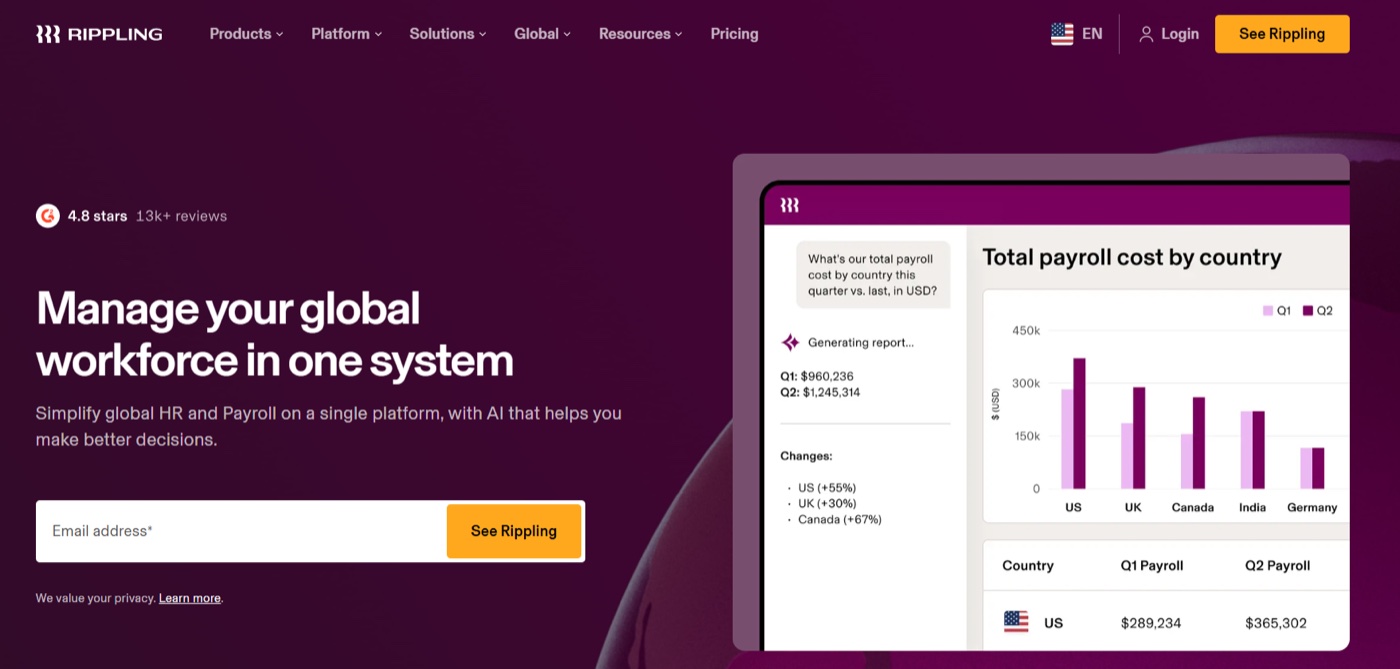
An HRIS localized for 185+ countries: Fields, documents, and currencies adjust to each employee's work location, and admins and managers build reports and policies from a view localized for them.
Three ways to hire abroad: You can pay contractors without a local entity, hire employees through Rippling's EOR, or run payroll through your own entities.
Custom workflows: Admins build workflows that notify people about important access changes and automate admin tasks, like bonus reminders.
Self-service reporting: The report builder covers employee trends across every country in one place, and admins and managers automatically see only the data they're cleared for.
Pricing model
Rippling doesn't publish prices. You request a custom quote based on the services you need, your headcount (employees plus contractors), and where you're headquartered.
Where the platform pushes back
Users say the sheer number of key features and settings takes time to learn. Workflows and policy rules need time to configure, less common options are hard to find, and the documentation doesn't always cover edge cases. Cost comes up repeatedly, since pricing adds up as you turn on more modules.
On the implementation end, users wanted more hands-on guidance, and response times from Rippling's help team vary by issue.
Device provisioning and lifecycle operations
Every tool so far stops at the account. Device lifecycle platforms handle the physical side of provisioning. They buy or store the laptop, configure it, ship it, then bring it back at exit and decide whether to reuse, resell, or destroy it.
Firstbase
Firstbase connects to HR systems like Workday, BambooHR, and Namely, and to identity providers like Okta and Azure AD, so the hire or exit you record there sets the device workflow in motion. Equipment ships to 150+ countries. When HR adds a new hire and Okta creates the profile, Okta sends an API call to Firstbase, which emails that person to choose from the devices they're eligible for. Exits run the same way in reverse. HR updates the employment status in Workday; the change feeds Firstbase, and the return starts automatically.
Day-one laptops from the same trigger: The device ordered off the HR or Okta event arrives encrypted with Okta SSO requirements already turned on. Through MDMs like Jamf, it downloads what it needs and configures automatically, with no IT handoff before the employee's first login.
Offboarding that starts at the identity layer: A SCIM delete from Okta or Azure AD triggers the device return using your default rules. The offboard endpoint adds finer control over the last working date, which items come back or stay, and where they ship.
Proof of data erasure: Every retired device gets a Certificate of Destruction aligned with NIST 800-88, stored in the platform alongside that device's full history.
Stock that refills itself. Admins set minimum and maximum thresholds per product and warehouse. When stock drops below the minimum, Firstbase automatically creates the restocking order, so you aren't left short of laptops when a new hire starts.
Pricing model
Firstbase uses transparent, all-in pricing per seat. Your cost tracks headcount, which keeps budgeting simple as the team grows.
Where the platform pushes back
User feedback centers on setup edge cases. Firstbase's HRIS connections run through Merge.dev, and some HR systems only create an employee record after a new hire finishes their onboarding tasks.
Since Firstbase uses that record to send the welcome email, the trigger can arrive too late for on-time delivery. That's an HRIS behavior rather than a Firstbase one, but reviewers wanted Firstbase to flag it during implementation; the fix was a custom automation built on the Firstbase API.
Now that I only have one procurement specialist who's managing all of our equipment across the globe – which is, in essence, around 4000 laptops – it's very difficult for us to maintain the same level of success without having a managed partner like Firstbase helping us facilitate that.
- Thomas Olson, Manager, IT Program Management, New Relic
When is deprovisioning actually done?
Disabling an account closes the digital side of offboarding but may not close the asset record. Let’s look at what a complete deprovisioning check should cover.
What it covers | What commonly gets missed |
|---|---|
Account and application access is revoked | Physical equipment remains with the former employee |
Device return is initiated and tracked | Return status and location are unclear |
Device reaches the warehouse or designated destination | Asset records are not updated promptly |
Device is wiped and prepared for reuse | Secure disposition is handled as a separate process |
Return is documented against the employee and asset | IT lacks a complete record of the device lifecycle |
The distinction is important because retrieval is not simply a shipping task. Returned equipment needs to be graded, wiped, repaired, redeployed, or recycled before it can leave the lifecycle. Firstbase reports 97%+ retrieval rates and a retrieval turnaround of fewer than 30 days.
The best user provisioning software to start with
The right starting point depends on where your provisioning gap sits. Identity providers handle access, governance platforms control who should have that access, and HR-driven platforms connect provisioning to employee data.
Tool type | Right choice if | Not the right choice if | Add Firstbase if |
|---|---|---|---|
Okta | You need automated joiner, mover, and leaver access workflows across applications. | Your main gap is provisioning or retrieving physical equipment. | You want device workflows triggered from HR or identity events. |
JumpCloud | You want identity, access, and managed endpoints in one platform. | You need physical procurement, shipping, or asset recovery. | You need the logistics layer beyond endpoint management. |
SailPoint / Saviynt | Access governance, least privilege, reviews, and compliance are the priority. | You primarily need equipment delivery and recovery. | You need physical assets tied to the broader employee lifecycle. |
Rippling | You want employee data to drive HR and IT workflows from one platform. | Device logistics extend beyond what the employee workflow manages. | You need equipment procurement, delivery, retrieval, and lifecycle tracking connected to those employee events. |
Is your provisioning finished when the account is?
Identity tools answer who gets access and for how long. The laptop needs that same answer, from the same record, on an employee's first day and on their last.
You don't have to replace Okta, JumpCloud, or the IGA platform you already run to get there. Firstbase adds the device layer and listens to the HR and identity events those tools already handle, so IT stops reconciling separate systems by hand. HR no longer opens a ticket to order a laptop for every new hire.
Returned devices are cleaned and prepared for redeployment instead of sitting in a closet, and finance can pull settlement reports and resale proceeds from the same device history your auditors check.
Customers report 1.8x better asset tracking after automating it with the platform. Book a demo to see how Firstbase connects to the HRIS and IdP you already run.
Written by
Ahmad Zakaria
Ahmad Zakaria covers IT operations, hardware lifecycle management, and distributed workforce solutions at Firstbase. His content is built from real customer data, operator interviews, and hands-on experience managing devices across 150+ countries.
Get started with
Firstbase today
Remote and hybrid work aren't going anywhere. It's our mission to make it easier to manage the assets your distributed team needs—from onboarding through offboarding and every repair, replacement, and upgrade in between.
Fill out the form and a member from our team will reach out by phone!
Get a Live Demo